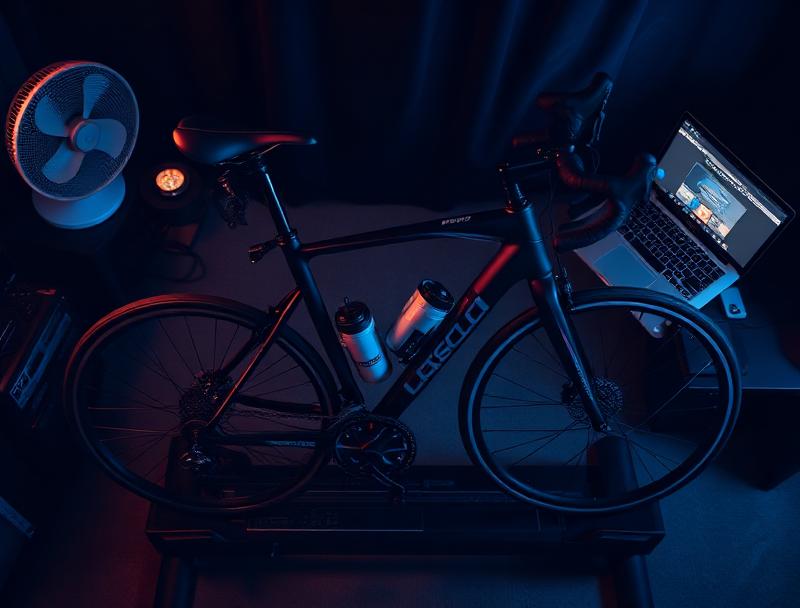
How to Start Indoor Cycling: Complete Beginner's Guide UK 2026
Last updated: June 2026
Why Indoor Cycling, and Why Now
Indoor cycling has stopped being the boring, sweaty corner of the sport. Smart trainers that simulate real-road feel, virtual worlds with thousands of other riders, structured training apps that build genuine fitness, and properly-engineered smart bikes you can ride in shorts at 7am — the experience now is unrecognisable from what it was even five years ago.
This guide is the complete starting point. It assumes you know nothing about indoor cycling and walks you through everything: what to buy, what it costs, how to train, and how to actually enjoy it.
What Indoor Cycling Actually Means
"Indoor cycling" covers three different things:
- Smart trainer cycling. You mount your real road or gravel bike on a turbo trainer and ride it indoors, usually paired with an app like Zwift. This is what most cyclists mean.
- Smart bike cycling. A complete indoor bike with built-in resistance and connectivity (Wattbike, Wahoo Kickr Bike, Tacx Neo Bike). No real bike needed.
- Studio-style indoor cycling. Peloton-style instructor-led classes on a fixed bike. Different sport, more about fitness than cycling performance.
This guide focuses on the first two — the cycling-as-cycling end of indoor riding, used by people training for sportives, road racing, gravel events, or general fitness.
The Three Pieces of Hardware You Need
1. A Smart Trainer (or a Smart Bike)
The trainer is the heart of the setup. It's the machine that provides resistance, measures your power, and talks to your training app. Three sub-categories:
| Type | Price | Best for |
|---|---|---|
| Wheel-on smart trainer | £200–£400 | Tightest budgets, occasional use |
| Direct-drive smart trainer | £280–£900 | Most riders |
| Smart bike | £1,500–£3,500 | Frequent indoor riders, multi-user households |
For 90% of new indoor cyclists, a direct-drive smart trainer in the £400–£500 range is the right call. The Wahoo Kickr Core 2 (£464.99 on offer, RRP £499.99) is the consensus best-value pick. If you're tight on budget, the Van Rysel D100 (£279.99) is the most-recommended entry-level direct-drive.
2. A Bike (Unless You Have a Smart Bike)
Almost any bike works on a direct-drive smart trainer. Road, gravel, hybrid, mountain bike — they all bolt on. You'll need a cassette compatible with the trainer (or use the Zwift Cog system if you've gone that route). Mountain bike riders may need a different rear axle adapter.
One word of caution: don't put a high-end carbon road bike on a turbo trainer if you're worried about it. Smart trainers fix the rear of the bike rigidly, which puts more stress on the frame than rolling on the road. Most modern frames handle it fine, but check your manufacturer's warranty before mounting an expensive bike.
3. A Device to Run the App
You need something to run Zwift, TrainerRoad, Wahoo SYSTM, or whatever app you choose. Apple TV 4K (£170) is the most popular dedicated option because it lives by your TV permanently. An iPad, smartphone, or laptop you already own also works.
What It Actually Costs
Three realistic budget levels:
| Setup | Total upfront | Includes |
|---|---|---|
| Bare minimum | ~£330 | Van Rysel D100, existing device, basic fan, mat |
| Recommended | ~£900 | Kickr Core 2, Apple TV, mat, decent fan, HRM |
| Premium home setup | £2,500+ | Smart bike or Kickr V6, Wahoo Headwind, big TV, full kit |
Plus an ongoing subscription of around £15–£20 per month for the training app.
The App: Where the Riding Happens
Hardware without a good app is dull. The four apps worth knowing:
- Zwift (£17.99/month). The market leader. Gamified virtual worlds, social riding, races, structured workouts. Best general-purpose choice.
- TrainerRoad (~£16/month). Pure structured training. No virtual world. Better if you have a specific event to train for.
- Wahoo SYSTM (free tier + paid). Wahoo's training platform. Good content from The Sufferfest era. Free tier includes some workouts.
- MyWhoosh (free). A genuinely free Zwift-style virtual world. Won UCI Esports Worlds in 2024–2026. The best free option.
For new riders, start with Zwift. The gamification (you'll be earning badges, unlocking jerseys, and seeing other riders within five minutes) is what keeps people coming back during a January training block.
Setting Up Your Pain Cave
"Pain cave" is the affectionate name for an indoor cycling space. Whether it's a dedicated spare room or a corner of your kitchen, a few things make a huge difference:
- Two fans, minimum. One pointed at your face, one at your torso. You'll sweat much more indoors than outside because there's no wind. Two cheap pedestal fans are better than one expensive fan.
- A trainer mat. Protects your floor from sweat, reduces vibration through the floor, and keeps the trainer from sliding.
- A towel. One on the bars, one on the floor, ideally a third for after.
- Sweat protection for your bike. A simple fabric sweat guard from top tube to bars stops sweat dripping onto your headset and bottle cage. Sweat is corrosive — this is genuine protection, not an upsell.
- Two bottles. One water, one with electrolytes for sessions over an hour.
- A screen at the right height. Eye-level or just below. A TV mounted at standard height is too high — you'll be looking up for hours.
Your First Month of Indoor Cycling
Don't go straight to racing. Don't sign up for a 12-week training plan in week one. Don't try to do an FTP test on day one. The first month is about getting comfortable.
Week 1: Just Ride
Three or four 20–30 minute easy rides in Zwift's free-ride mode. Get used to the kit. Find out how hot you get, where the noise is coming from, what's comfortable and what's not.
Week 2: Try the Social Side
Join a couple of group rides at a comfortable pace. Try a Robo Pacer ride (always-on group rides led by an AI rider). Use the Zwift Companion App to give Ride Ons.
Week 3: Set Your FTP
Do Zwift's FTP test or the shorter Ramp Test. This sets your training zones and unlocks structured workouts. Don't worry about the number — just get a baseline.
Week 4: Try a Workout
Pick a beginner-friendly structured workout (Zwift's "Foundation" series is good). The trainer will hold your power for you in ERG mode — all you do is pedal at the prescribed cadence.
By the end of month one, you'll know whether indoor cycling clicks for you, and you'll have a sense of what to upgrade next.
Indoor vs Outdoor Cycling: Honest Differences
- You'll sweat more indoors. No wind cooling. Plan your hydration accordingly.
- One hour indoors is genuinely harder than one hour outdoors. No coasting, no traffic lights, no recovery. A one-hour Zwift race is a real workout.
- Your power numbers may surprise you. Outdoor power estimates (from Strava, etc.) are often higher than measured indoor numbers. The indoor figure is the truth.
- Indoor riding is concentrated training. An hour indoors usually equals 90 minutes of mixed outdoor riding in fitness terms.
Common Beginner Mistakes
- Going too hard too soon. Indoor cycling rewards consistency over intensity. Three steady 45-minute rides a week beat one occasional smashfest.
- Not using a fan. You'll think you don't need one. You do.
- Skipping the trainer mat. Sweat damage to wooden floors is permanent. The mat is £25 well spent.
- Buying too cheap a trainer. A non-smart trainer is a false economy. The experience is much worse and you'll upgrade within a year.
- Thinking you need premium kit on day one. A Van Rysel D100 and a £20 fan will get you started. Upgrade as you commit.
- Forgetting to clean your bike. Indoor riding is hard on your drivetrain because of sweat. Clean and lube your chain weekly.
Indoor Cycling Etiquette (Zwift Specifically)
- Don't sandbag races (entering a category below your fitness level).
- Give Ride Ons freely — it's the in-game equivalent of a thumbs up.
- If you join a group ride, ride at the group's pace. Drifting off the front constantly is bad form.
- Use the Zwift Companion app for messaging — typing on a controller mid-ride is awful.
FAQ
Do I need to be fit to start indoor cycling?
No. Zwift, TrainerRoad and others all have beginner-friendly content, and you can ride at whatever pace suits you. Indoor cycling is one of the most accessible ways to start cycling at all.
Will indoor cycling damage my bike?
Properly mounted on a quality direct-drive trainer, no. Sweat is the bigger risk than mechanical stress — protect your bike with a sweat guard.
How often should I ride indoors?
Three to four sessions of 30–60 minutes per week is a sustainable starting point. Most riders use indoor sessions to supplement outdoor riding rather than replace it.
Can I just use a stationary bike from a gym?
Most gym bikes don't connect to Zwift or other apps and don't measure power accurately. They're fine for general fitness but not for cycling-specific training.
Is the Cycle to Work scheme available on indoor cycling kit?
No. Turbo trainers and smart bikes are explicitly excluded — they're not classified as cyclists' safety equipment and aren't used for commuting.
Will my power on Zwift match my power outside?
Indoor power tends to be slightly lower than estimated outdoor power for the same effort, mainly because there's no wind cooling and recovery is harder. Power-meter-measured outdoor power should match Zwift power closely.
Next Steps
- Read our Zwift Setup Guide for UK Riders for a step-by-step pairing walkthrough
- See our Best Smart Turbo Trainers UK 2026 for trainer recommendations
- Check the Best Indoor Cycling Apps UK comparison if you're undecided on a platform
- Start with our What Is FTP guide once you've done your first month
Pricing reflects RRP and standard subscription rates at the time of writing. Confirm current pricing before purchase.
Shop the gear mentioned in this guide
- Minoura Mag Ride 60D Trainer
- Wahoo KICKR CORE 2
- Wahoo KICKR Floormat
- Wahoo KICKR HEADWIND Fan
- Continental Home Trainer II Tyre
Browse all indoor cycling trainers, accessories and sports nutrition at Indoor Cycling Solutions.